One-Time Offer · Upgrade #5 · The Sell-More Layer

Making the Art Was Easy. Selling It Is the Hard Part. Let's Fix That.

Great designs don't sell if nobody finds them. The Seller Toolkit hands you ready-to-paste Etsy & KDP listings, keywords and tags, tells you which niches to make, and builds a whole batch of prompts at once. Create less, sell more.
Seller Toolkit workspace preview
Add the Seller Toolkit No Thanks
One-time price · Unlocks in the app you already own · No subscription
Picture This

Your Listing Written. Your Niche Chosen. Your Batch Built — In Minutes.

No more staring at a blank Etsy listing or guessing what to make. The Seller Toolkit helps you move through the repetitive seller work faster — from product direction to batch prompts to listing preparation.
01
Click Once For A Full Listing With Tags
02
Click Once For A Focused Niche Idea
03
Click Once For A Whole Batch Of Prompts
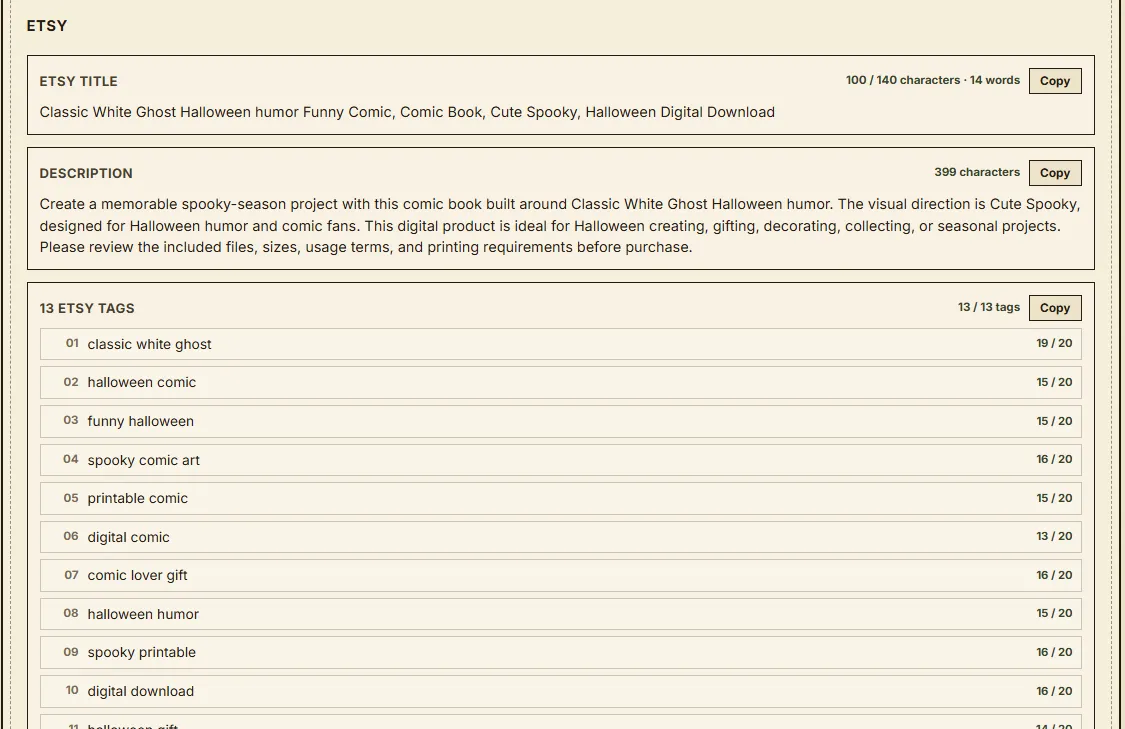
Seller Toolkit listing with title description and tags
Listing output with title, description, tags and marketplace metadata.
Marketplace Visibility
Findable = Sellable

Most sellers lose visibility to weak titles, vague descriptions and poor tags. Good marketplace SEO helps put your artwork in front of buyers already searching for that type of product. The Listing & SEO Assistant helps prepare titles, tags, keywords and descriptions around the product you want to list.

The Seller Bottleneck

The Real Reason Most Stores Stall.

SEO Is Confusing

Titles, tags, keywords, categories… get them wrong and your listing becomes much harder for buyers to find.

“What Do I Even Make?”

Guessing product directions can burn hours before you even start creating the collection.

One-At-A-Time Is Slow

Building a book, printable collection or sticker pack one prompt at a time kills your momentum.

The Seller Toolkit tackles all three — so you spend less time stalling and more time preparing products to sell.

Inside The Seller Toolkit

Everything You Unlock.

Listing / SEO Assistant

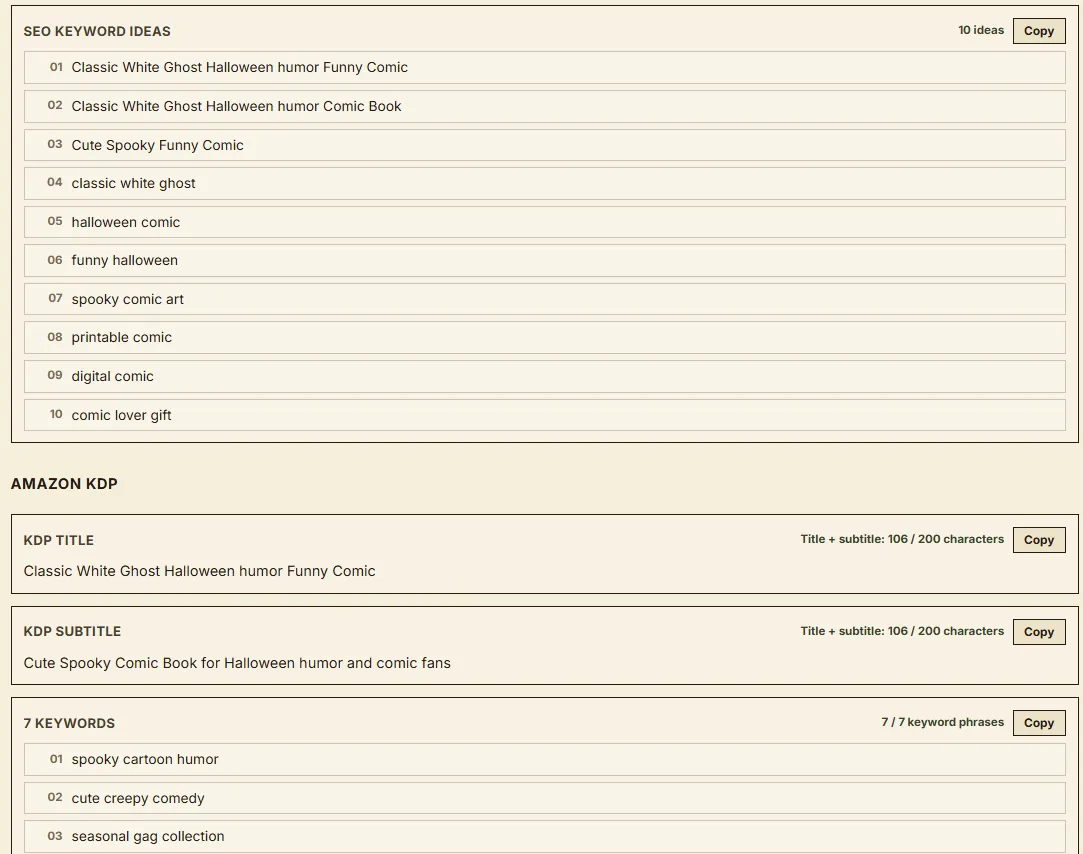
Prepare a ready-to-paste Etsy title, description and 13 tags from your current product. For Amazon KDP, generate a title, subtitle, 7 keywords, description and category ideas.

Niche Finder

Filter curated Halloween product ideas by product type, niche category and marketplace. Get a product idea, visual direction, suggested themes and buyer angle before you start creating.

Batch Builder

Turn one concept into 10, 20, 30 or 40 coordinated prompts for Comics, Memes, Coloring, Quotes, Patterns and Stickers — then copy the batch into your creation workflow.

10 Prompts
20 Prompts
30 Prompts
40 Prompts
Junk Journal Batch Projects

For Junk Journals, choose 3, 5 or 10 themes and build prompt sets across all 11 junk-journal asset types for each selected theme.

Works Across Your Creation Formats

Use the Seller Toolkit alongside your Comics, Memes, Coloring, Quotes, Patterns, Stickers and Junk Journal workflows — taking you from product direction → prompt production → listing preparation.

Before vs. After

Same Creator. Very Different Workflow.

The Seller Toolkit removes the repetitive product-planning, batch-prompt and listing-preparation steps that slow down the path from artwork to marketplace.

Without The Seller Toolkit
Blank-Listing Paralysis
Weak Titles & Tags Make Discovery Harder
Guessing What Product To Make Next
Building Every Prompt One At A Time
With The Seller Toolkit
Listing + Marketplace Metadata In One Workflow
Titles, Tags & Keywords Built For Discoverability
Curated Product Directions With Buyer Angles
Build Up To 40 Coordinated Prompts In One Batch
The Sell-More Layer

Stop rebuilding the seller workflow from scratch. Find the direction → build the batch → prepare the listing.


Seller Toolkit · Upgrade #5

Turn Your Studio Into A Store That Sells.

You already have the creation tools. Now add the layer that helps you decide what to make, build coordinated prompt batches and prepare the marketplace listing.

Everything Included
Seller Toolkit — The Sell-More Layer
Listing / SEO Assistant — Etsy + Amazon KDP
Niche Finder — product ideas, visual direction, themes & buyer angles
Batch Builder — 10 / 20 / 30 / 40 coordinated prompts
Junk Journal Batch Projects — 3 / 5 / 10 themes × all 11 asset types
Works Across Your Creation Formats — Comics, Memes, Coloring, Quotes, Patterns, Stickers & Junk Journals
Unlocks Automatically When You Sign In
One-Time Upgrade Price
$197
$47

No subscription · Yours forever

🧰 Yes — Add The Seller Toolkit
One-time payment · Unlocks in the app you already own
Frequently Asked Questions

Questions About The Seller Toolkit?

Here are the most important things to know before adding the Sell-More Layer to your workflow.

What exactly is the Seller Toolkit?

The Seller Toolkit is a seller-focused workspace designed to help bridge the gap between creating artwork and preparing a product to sell. It includes three main modules: Niche Finder, Batch Builder, and Listing & SEO Assistant.

What does the Niche Finder do?

The Niche Finder helps you explore curated Halloween product directions instead of starting every new product from a blank page. You can filter ideas by product type, niche category and marketplace, then get a product idea, visual direction, suggested themes and buyer angle.

Does the Niche Finder guarantee that a product will sell?

No. It helps you identify and structure product directions more efficiently, but it does not guarantee sales, rankings, traffic or marketplace performance. Your results still depend on the product, presentation, marketplace demand, competition and how you market it.

What does the Batch Builder create?

The Batch Builder creates coordinated batches of prompts so you do not have to build every prompt individually. For Comics, Memes, Coloring, Quotes, Patterns and Stickers, you can create batches of 10, 20, 30 or 40 prompts.

Does Batch Builder generate 40 finished images at once?

No. The Batch Builder generates the batch of structured prompts. You then use those prompts with your chosen image-generation workflow to create the actual artwork.

How does Batch Builder work with Junk Journals?

Junk Journals use a different batch structure. You can choose 3, 5 or 10 themes, and the Toolkit builds prompt directions across all 11 Junk Journal asset types for each selected theme.

What does the Listing & SEO Assistant create for Etsy?

For Etsy, the Listing & SEO Assistant can prepare:

  • Etsy title
  • Product description
  • 13 Etsy tags
What does it create for Amazon KDP?

For Amazon KDP, it can prepare:

  • Title
  • Subtitle
  • 7 keyword ideas
  • Description
  • Category ideas
Does the Seller Toolkit automatically publish my Etsy or KDP listing?

No. The Toolkit helps you prepare listing copy and marketplace metadata. You still review your final product, package the files, upload them and publish the listing through Etsy or Amazon KDP yourself.

Which product formats work with the Seller Toolkit?

The Toolkit is designed to work alongside the creation formats in the Halloween Creator Studio workflow, including Comics, Memes, Coloring, Quotes, Patterns, Stickers and Junk Journals.

Is the Seller Toolkit an image generator?

No. The Seller Toolkit focuses on product planning, batch prompt creation and listing preparation. The finished artwork is still created through your image-generation workflow.

Do I need advanced SEO or prompting skills?

No advanced prompting or marketplace-copywriting experience is required. The Toolkit is designed to give you a structured starting point for product ideas, prompt batches, titles, descriptions, tags and keywords. You can still edit and refine the output before using it.

Is there a monthly subscription?

No. The Seller Toolkit is offered as a one-time upgrade.

How much is the Seller Toolkit?

The Seller Toolkit is available as a $47 one-time upgrade.

The Sell-More Layer

Creating the artwork is only one part of the workflow. Find what to sell → build the batch → prepare the listing.